Comments

Powered by Blogger.

Facebook

Categories

Videos

Technology

windows

Sports

3/android/small-col-right

Business

Header Ads

Propellerads

Social Media

Photography

Popular Posts

Latest Post
Showing posts with label make money online. Show all posts

How to Create Virtual Credit Card via Entropay and Bancore

Written By Unknown on Thursday, October 2, 2014 | 8:06 PM

Virtual Credit Card has made online transaction simple and secure. It’s the best alternative of plastic card that offers plenty of options just like real one with much more security and flexibility.

The real benefits of Virtual card or VISA Card is that both the persons having debit card or credit card can use prepaid virtual card to securely transfer or receive money while banking with National or Internal accounts.

User won’t face any security issue while using the Virtual card as provider offers a card with new details protecting the owner identity.

You may ask What are the special advantages of using Virtual card  when Bank will offer Virtual Credit card option as soon as client apply for credit card ?

The answer is very simple: There are many persons who don’t have Credit card but own only Debit card and in need of VISA/Master card for International banking.

Virtual card is the perfect option we can use to fulfill our purpose while there are limitations in debit card for International Banking.

There are many Virtual card providers available on the internet but we will recommend you to use the best one having the features like instant setup and world class security, for example Entropay amd Bancore.


How to create Virtual VISA Card via Bancore


Bancore is very good Virtual card provider offering security features like PCI DSS Certified, 3D-code Security, and strong Firewall, Virus Detection and special ‘access to your account only for certain IP addresses’.

Bancore offers instant setup via Mobile authentication just follow the steps bellow to create your personal Virtual card.


Step 1.) Go to Bancore.com and press Signup button to start the setup

Step 2.) On the next page select your country and put mobile number and press “Next”

Step 3.) This is the most vital point across the Setup, You have to create a personalize 4 digit PIN number required to login to account later.

As soon as you press call button a international call with automated voice will come to registered Mobile number to authenticate and ensure PIN number.

Step 4.) Hope you’ve successfully setup PIN number now again go to Bancore homepage and login with required details.

Step 5.) Now enter personal details including full name and email id and SAVE, you can also setup personal details via Facebook profile

Step 6.) Your Bancore Virtual Credit Card with full details will be automatically created instantly

Now your Bancore Virtual VISA Card is ready to use and there are a number of options the account includes, will allow you to transfer or receive money anytime.


How to Create Virtual credit card via Entropay

Entropay is another good alternative having the security like VeriSign security, 3D-Secure Code and strong Firewall and Virus Detection.  

Step 1.)  Go to Entropay.com and press Sign Up to create your account  
Step 2.) Enter your genuine personal details unless your account will be deleted and press “Get your Card”  

Step 3.) Now you will get Virtual Credit card without any details, to get further information all you have to add and verify Bank account or Credit/Debit Card. Now select Debitcard/Credit card option and follow the tutorial  

Step 4.) To Topup card select i) Select currency along with minimum amount under “CHOOSE YOUR LOAD AMOUNT” ii) Your Debit Card details under “ADD YOUR CREDIT/DEBIT CARD” and press “Confirm details”.  

Step 5.) On the next Window you have to verify Debit card and complete the further steps.

Step 6.) You will get Virtual Credit card full information as soon as transaction complete. This account is starter type and has limitation: Maximum Top-up and payment receive up to €250.00,  

Step 7.) To get Premier access: Go to “Account type” > Select “Provide identification documents” and Voter ID card, Passport, Driving License along with photo and verify email and Mobile number.

Your Entropay Virtual Credit card is ready to make transactions

Also Visit:
steps-on-how-to-apply-rcbc-my-wallet
complete-list-of-paypal-bank-codes

Five Easy Ways to Monetize your Blog

Written By Unknown on Wednesday, October 1, 2014 | 4:24 PM

Only few people knew and experienced on how to make money by blogging. I’m one of those few. Before, I don’t know how to make a blog and even don’t know that it can give a steady income as long as you are willing to work hard.

For me, my blogs don’t only exist to make money: it is more than money that I build several blogs I have now. However, I admit that money is the bloodline of your website. As a blogger, you must pay for web hosting and other maintenance of your site so one source of money to pay for it is the money that your blog makes.

Some blogs exist solely for hobby of the owner while other blogs are really meant to make some extra income for the blogger. I think it is not bad to make money from your website as long as you are doing what is right and helpful for your readers and visitors.

There are many trash websites out there intended only for money. You can easily distinguish these sites from good one. If you accidentally visited these kind of sites, you will notice that the site has more advertisements than its content.

As a suggestion: don’t make blogs solely for money, invest in your website by adding and posting quality articles and content. I’m sure your hard work will pay off in the future.

I listed below some of the ways on how to monetize your blog. These methods are easy to carry out and I also done it and currently using some of the monetization methods that mentioned below.

1. Google Adsense

Without a doubt, Google Adsense is the best and easiest way to make money from your blog. It is one of the services offered by Google to bloggers and website owners so they can earn from the advertisements appearing in their site.

It is commonly called Adsense as a way to shorten the phrase. In order to be a part of Adsense program, you have to apply first for an account. Basically, the requirement is you to have a website or blog with sufficient content and enough visitors to your site.

If you’re blog is new and you don’t have enough visitors (maybe around 50 to 100 visitors per day), there is a high chance that your application will be rejected. Before you apply for an Adsense account, make sure that your blog has good contents and regular visitors preferably coming from search engines.

There are several ways on how to earn from Adsense. It can be through your blog’s content, through search, feeds and more. After the approval of your application, you can create ad unit or channel that you should put into your blog so Google Ads will start appearing on your site.

According to Google, the revenue share of Adsense is as follows: for Adsense for Content – 68% goes to publisher, 32% goes to Google. While for Adsense for Search, 51% of revenue goes to publisher while 49% goes to Google.

money blog

2. Infolinks

Infolinks is another monetization strategy that you can use to make money from your blog. I’vee been using this one for quite sometime but have not able to get a single payment because I didn’t yet reach the threshold limit for payment. Hopefully before June of this year, I’ll reach the payment limit and cash out my earnings through PayPal .

Similar with Adsense, you also have to apply for an Infolinks account so you could put a code to your blog and then ads will start appearing. Infolinks has different forms of ads compared with Adsense because it uses the in-line text ads. Maybe you notice the double underlined words when you visit some blogs. When you hover your mouse to the word, a window will pop out containing the ads.

Infolinks is just a supplement for Adsense and will never beat the income Adsense is giving to blog owners. It has lower cost-per-click and revernue per thousand impression than Adsense.

3. Chitika

Chitika is another way to earn from your blog which is much similar with Google Adsense. You also need to apply for an account if you want to use this monetization to your blog.

The difference between Chitika and Adsense is the way they show ads. In Chitika, you will see the ads together with a n image while in Adsense you can only see either an image or text ads and it will not appear at the same time.

Chitika will be best used if your blog has traffic from US and Canada because most of the ads are coming from those countries. While waiting for the approval of Adsense application, you can use this temporarily.

4. Be an Affiliate

Another way to earn money from your blog is through affiliate commissions. in this way, you will promote other people’s products on your site by adding a referral link or banner to your content or in the side bars.

When a visitor click and use the link or banner and then buy the product, you will earn some commission from the sale depending on agreed terms and conditions between you and the product owner.

Right now, I’m starting to place some affiliate banners like what you see on the right side bar. It is the banner of HostGator, a web hosting company.

Some of the most popular affiliate sites in the Internet today are ClickBank, Amazon Affiliate, and Commission Junction. I’ll be discussing these site more deeply in the succeeding posts that I’ll publish to give more information on how to be an affiliate. Hopefully this year I can start a website that will focus on Amazon products.

5. Direct Advertisement

Some blogs earn more money from direct advertisements. These ads are from people or companies who will contact you to advertise on your site. Therefore, it is important to put a contact page in your site or even better if you have a page where advertisers will know something about your blog, your advertisement rate and the number of visitors your blog is receving.

Normally, most blogs offer advertising options to advertisers in the forms of banners and sponsored posts. I notice that a 125 x 125 mm banner is the most common size most blogs offer to people who want to advertise.
Can I Use all these Monetization Methods?

Yes. However, you should make sure that each method is distinguishable from each other because Adsense is very strict about how their ads must appear on your site. The best way to do this is by making the color of each method different from each other. No two methods should have the same color. You will learn more about how and what should you do about the implementation of ads by carefully reading the terms and conditions of Adsense, Infolinks and Chitika.

In addition, don’t put too many ads to your blog because it is not helpful for readers and visitors. They will be distracted if you place many ads. Currently, I’m only using three ad units for each blog that I have to balance the earning potential and visitor’s satisfaction.

How to Earn Money with Google Adsense


Google Adsense is the most popular monetization method for blogs and websites. It is one of the services provided by Google for all publishers and webmasters who want to earn money from their sites. It is also commonly known as Adsense.

If you are a keen observer, you may notice advertisements from news websites, blogs and other social networking sites that uses Adsense. In the past, you will clearly notice it because it has a label “Ads by Google.” However, several months ago, it was changed to “Ad Choices.” I don’t know exactly why they change the word and some features were also changed based on the feed backs of publishers.

How can You Earn Money from Google Adsense?

Before you could make money from Adsense, there are several things you should satisfy or need to have. First of all, you should have your own blog or website. It can be a free domain and hosting or you can bought your own. Some people make money from Adsense using Blogspot or Hubpages but most of the bloggers and website owners are buying their own domain name and web hosting.

Secondly, it is not enough that you have a website running, it must have a useful content for visitors and readers. It means your blog or website should have enough posts or articles not just one or two pages. Google doesn’t require a specific number of pages or posts to make your website useful. However, the more post or pages, the higher the probability of approval of your application.

Thirdly, you should have your own Google Adsense account in your name, not other people’s name. You can have it by applying for an account by visiting their application page. You may go to adsense.google.com to start your application. Remember: you must have a useful website before attempting to apply for an account otherwise it will be rejected. Take note also that your address should be where you are permanently living not a temporary one because Google will send a mail containing a PIN code for your account when it reach US$10.

Keep in mind that you cannot change your country address if you are living in certain places like Philippines and other countries specified in Adsense terms and conditions.

Fourth, you should drive organic traffic to your blog so visitors can see Google Ads. This step is very important because if there’s no one visiting your site, no one will see the Ads and no earning for you. As a publisher or website owner, you can earn from Adsense through CPM or eCPM. CPC is the cost-per-click of the ads. Each ad has its own CPC, meaning one ad costs higher or lower than the other ads. Another one is eCPM or the cost per one thousand impression of ad in your website. Most advertisers use CPC than eCPM these days because it will give them the higher probability that visitors will make actions on their advertisements just like singing up for newsletter or buying their products.

Fifth, it is not enough to drive traffic to your blog, you should make it sustainable. It means you must post useful articles regularly and increase your ranking in Google search for the keywords you want to rank higher. By making it sustainable, you will make money with Adsense regularly and will add to your monthly income. By the way, you can get your payment if you reached $100 and it will be sent to you the next following month before the 30th. You could choose to receive it through Western Union or via check payment if you are living in the Philippines. In some countries, only check payment is available. You may visit their site to learn more about their terms and conditions.
Final Thoughts

I’ve been earning from Google Adsense since last year and I believe it is one great source of second income stream for my family. You could also do it through hard work and continuous effort to make your website more beneficial for your visitors. One best thing about it is that even when you are sleeping, you are still earning from Adsense. It is simple and easy to apply once you satisfied all the requirements.

Complete list of Paypal Bank Codes in the Philippines

Written By Unknown on Wednesday, September 24, 2014 | 4:47 PM


What is the 9-digit Bank Code in Paypal?

If you are withdrawing PayPal funds to your bank account in the Philippines, you’re probably wondering what the “Bank Code” is.

Don’t worry, PayPal has finally released the official list of Bank Codes for PayPal Philippines!


Paypal Bank Codes in the PhilippinesUsers in the Philippines now have no problem attaching their bank accounts in Paypal, which means they can request to withdraw PayPal funds to their local bank accounts.

Be it the bank code for BDO, BPI, Citibank, Security Bank, Metrobank, Unionbank or any other bank in the Philippines, we’ve got them here - 100% confirmed and verified.


All these bank codes have been tried, tested and proven to be correct by Paypal users in the Philippines. In case there are banks with missing codes or incorrect bank codes, leave a comment below so we can investigate.

Here is the complete list of verified 9-digit Paypal Bank Codes.


Top 5 Bank Codes used in Paypal

Bank Name
Bank Code
1BANCO DE ORO (BDO)010530667
2BANK OF THE PHILIPPINE ISLANDS (BPI)010040018
3METROPOLITAN BANK & TRUST CO. (METROBANK)010269996
4SECURITY BANK010140015
5UNION BANK OF THE PHILIPPINES (UBP)010419995


9-digit PayPal Bank Codes of other Philippine Banks


Bank Name
Bank Code
6ALLIED BANKING CORP010320013
7AUSTRALIA NEW ZEALAND (ANZ) BANK010700015
8ASIA UNITED BANK011020011
9BANGKO SENTRAL NG PILIPINAS010030015
10BANGKOK BANK010670019
11BANK OF AMERICA010120019
12BANK OF CHINA011140014
13BANK OF TOKYO010460012
14BANK OF COMMERCE010440016
15CHINA BANKING CORP (CHINABANK)010100013
16CHINA TRUST COMMERCIAL BANK010690015
17CITIBANK010070017
18DEVELOPMENT BANK OF THE PHILIPPINES (DBP)010590018
19DEUTSCHE BANK010650013
20EAST WEST BANK010620014
21FUJI BANK010640010
22HONGKONG AND SHANGHAI BANK (HSBC)010060014
23JP MORGAN CHASE BANK010720011
24KOREA EXCHANGE BANK010710018
25LANDBANK OF THE PHILS010350025
26MAYBANK OF THE PHILS010220016
27PHIL BANK OF COMMUNICATION (PBCOM)010110016
28PHIL TRUST COMPANY (PHILTRUST)010090039
29PHILIPPINE NATIONAL BANK (PNB)010080010
30PRUDENTIAL BANK010150018
31PHIL VETERANS BANK010330016
32RIZAL COMMERCIAL BANKING CORP (RCBC)010280014
33STANDARD CHARTERED BANK010050011
34UNITED COCONUT PLANTERS BANK010299995
35UNITED OVERSEAS BANK010270189

Happy online earning!
Philippine banks with Paypal bank codes: Allied Bank; Asia United Bank; BSP; Banco de Oro (BDO); Equitable PCIBank (same as BDO bank code); Bank of Commerce; Bank of the Philippine Islands (BPI); China Bank; China Trust; Citibank; Development Bank of the Philippines (DBP); Deutsche Bank; East-West Bank; Export Bank; Hong Kong and Shanghai Bank (HSBC); Landbank of the Philippines (Land Bank); Metropolitan Bank and Trust Co. (Metrobank); Philippine Bank of Communications (PBCom); Philtrust; Philippine National Bank (PNB); Prudential Bank; Veterans Bank; Rizal Commercial Banking Corporation (RCBC); Security Bank; Standard Chartered; United Coconut Planters Bank (UCPB); UnionBank of the Philippines (Unionbank); United Overseas Bank.

How To Verify Paypal Using RCBC Mywallet Visa Card

ATM MasterCard Debit Card (nTrust) Can verify your PAYPAL account

Written By Unknown on Saturday, August 23, 2014 | 7:08 AM

Free MasterCard Debit card sa nTrust! Sign up na dito!
You need a valid email for the activation.
grab na!


Sign Up for MasterCard Debit card HERE

AFTER ACTIVATING YOUR PROFILE, DO THIS FOLLOWING:
CLICK 1
CLICK 2
AND THEN, FILL OUT ALL THE DETAILS NEEDED TO VERIFY YOUR ACCOUNT
THEY WILL CALL YOU TOMORROW FOR YOU TO KNOW
WHEN YOU WILL BE RECEIVING YOUR MASTERCARD DEBIT CARD


NOTE:

KUNG HINDI NAMAN SA INYO NAKAPANGALAN YUNG UTILITY BILLS NYO,
SUBMIT NYO PARIN KUNG SA PARENTS NYO ITO NAKA PANGALAN.
TATAWAGAN NILA KAYO AT BIRTH CERTIFICATE ANG ALTERNATIVE NILA 
NA IPAPA-SUBMIT SA INYO SA supportdocs@ntrust.com VIA EMAIL.
 

This is what looks like when your account is verified:


P.S
Also you can verify your PAYPAL account using this card.

To withdraw your Paypal funds into your nTrust Card

Bank Name: SECURITY BANK & TRUST CO
Bank Code: 010140015


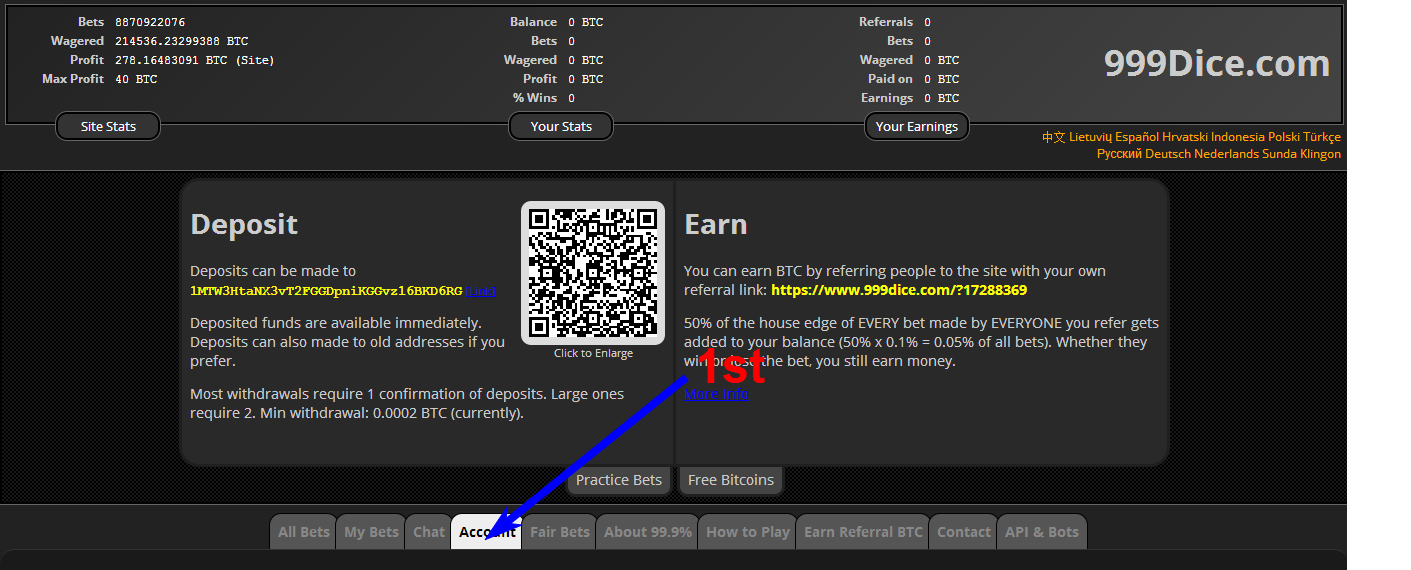
999 DICE Tutorial and Tricks

Written By Unknown on Saturday, August 16, 2014 | 8:32 PM

To those who don't have an account please register under my referral link: Click HERE!!!

First you Need to Set your own Account:


Requirements:

1.Mozilla Firefox(Browser Latest Version)
2.iMacros
3.Script

How to Install?

1.Open your browser
2.Download iMacros HERE
2. Press ctrl+shift+A
3.Go to extension check iMacros adds-on if enable then close
4.click iMacros icon


5.Download Script HERE
6.then Extract to Documents
7.Go Back to your browser then follow the image below. thats all! happy earnings :)

note: if you have any Question or Suggestion you are free to Comment below.

Socials Sap 5$ a day with AutoClicker(bot)

Written By Unknown on Thursday, August 14, 2014 | 11:55 PM

Here's the tut for Socialssaps..
To those who dont have an account please register under my referral link: HERE!!!

To activate your account just go to your email and confirm activation link.

Click here to DOWNLOAD firefox browser and Socialssap Tutorials!!!

Steps:
1. Download Firefox Browser first.
2. Install and Open your browser.
2. go to addson and Download IMACROS https://addons.mozilla.org/en-US/firefox/addon/imacros-for-firefox/
3. install then Click Restart Now
4. Download and extract this to Documents/Imacros/Macros 
DOWNLOAD Script HERE!!!
5. Open firefox then click the icon on the upper left. You will see now the Imacro at the side of the screen.
6. Sign in to Socialssaps.
7. Click services/youtube then accept. if unsupported please allow the pop script on your browser.
Make sure to log-in your google account
8. On the add ons, locate the folder where you extracted the script then click like if you will select like on socialssaps if dislike should be dislike.
9. Set Max at 60 then click play loop.
10. That's it you're good to go.
11. Just minimize firefox and leave it all to Imacro. :D
And continue to play spark or peko while imacro works for you :)

Happy Earnings!!!

CapTcoin Guide.

Written By Unknown on Wednesday, August 13, 2014 | 6:37 PM

Update as of 8/9/2014 9:27 PM the value of each Capt-Coin is 4999 satoshi = 0.00004999 btc, so if you have 1000 captcoins = $29.34 i can't believe this!. really. i thought it is going to increase after the campaign ends but it's only been 25 days since they started to distribute this New Crypto Currency and it was like 3 times the value now...

Hello to all, This is Dragonlayouts Of Symbianize, today i am going to Show you how to make an easy Money for free.  you can actually make an easy $10 dollars a day or more if you are determine to.
so let's get started.

First,
You Need to Go to this Site CLICK HERE that is my referral link which will going to give you 5% every time you finish completing the form so you can earn more and fast. so it is a win win situation.

Second,
in this page you are going to see that it is asking for your wallet address.


so let's get your wallet address,  go to this Web Address  http://captcoin.com/resources.html
and choose the right download link for your Operating System.


Third,
After you finish downloading the Wallet extract it, on my case I've extracted it on to my Documents.


Then Click the CAPTcoin-qt

Fourth,
after you click the "CAPTcoin-qt" wait for your wallet to synchronize then go to the Receive Coins >> and you will see your wallet address.
 *Note: From the Admin.

If the wallet doesn't sync. Follow these steps:
  • Close the wallet
  • In a new Windows explorer, open this path: %appdata%\CAPTcoin and hit enter
  • It should open a folder like C:\Users\\AppData\Roaming\CAPTcoin
  • In that folder, copy the file CAPTcoin.conf (included in the downloaded zip file)
  • Restart the wallet.

copy your wallet address and paste it to the previous form to start earning

You can only get free Captcoin for 50 days, for the first 10 days of the campaign you can get 1 coin every time you finish filling the form, after the first 10 days you can only get 0.50 coins for 30 days, then the remaining 10 days. you can only get 0.25 after that all the remaining coins will be destroyed,this will produce a big depletion. demand for coins.. and the value of every coins will rise up to 2-3 times or maybe more.

as of 8/9/2014, 100 coins = $1.00 it's easy to earn 1 dollar in 1 hour and if you want you can surf for 24 hours and earn almost 24 dollars or more if you are fast.
You can Trade your coins at https://coin-swap.net/

but i am encouraging you not to trade it now, as what i said earlier that after the 50 days campaign, the value of the coins will rise around 2 to 3 times or maybe more. so if you got 1000 coins now. you can only get $10
but if you wait for the campaign to finish . maybe your 1000 coins will be 20-30 dollars or more.

So What Are You Waiting For, Let's Start Earning Money. without investing any money,


MYVIEW / MOVETAB FIRMWARE

Written By Unknown on Thursday, July 31, 2014 | 5:44 PM


Please choose only the firmware that corresponds to your Tablet's Model.

MA700 ICS 4.0
MA700DX Jellybean 4.1
MA701QX Jellybean 4.2
MA705 ICS 4.0
MA710 ICS 4.0
MA715 Jellybean 4.1
MA900 ICS 4.0

For the Flashing procedure, click here

APPTRAILERS - REVIEW (iOS/ANDROID). INSTANT PAYMENTS TO YOUR VERIFIED PAYPAL ACCOUNT.

Written By Unknown on Tuesday, July 22, 2014 | 6:02 AM

Hello there… I want to share my personal opinion regarding App Trailers. This review will be based on my experience with App Trailers. Month ago I was checking my Gmail like I always do and while I was doing that I saw an ad saying earn free money or instant gifts by watching video trailers, inviting friends, and much more. I clicked on that ad and it was talking about an app called App Trailers. It read you can cash out instantly to your PayPal account after when you have earned 150 points or redeem other instant gifts like Amazon.com, Starbucks.com, Best Buy, Xbox points etc. I thought to my self, this is cool you earn free money just by watching video trailers, inviting friend, how cool is that. If you have an Apple product like Iphone, Ipad, Ipod or any Android device you can download this App Trailers to you device for free. I wanted more information regarding App Trailers before I download it to my device. I watched lot of YouTube videos and internet reviews on this particular app that I was interested in. After watching much information related to this app finally I download it to my Sony Ericsson Xperia Neo V. I was much exited I could not believe you earn money watching video trailers? I don’t know how many times in my life I have watched video trailers on television; mobile phones etc. and they never paid me to watch those video trailers. How come this app pays you? I had a question mark on my face.

Anyway when you open this app after download it shows 7 options at the top (Videos, Uploaded, Free App, Offers, Redeem, History and Settings). If you click on videos it will show the list of videos you can watch and earn 5 points each for watching videos. You see these videos are mostly game trailers. On daily basis App Trailers will send you free app (Region Specific) to your device that you can download and earn extra points. It also lets you earn more points by inviting friends and if he/she uses your username to download App Trailers then you get 250 points. (You see 150 points = $0.15) You need 150 points minimum to cash out to your PayPal account (Your PayPal account must be verified in order to receive instant money). At the very top right you will see a letter P and that stands for points that you have accumulated. Below that you will see level. Your level increases after you have accumulated good number of points. You can also upload one of your YouTube videos and if somebody watches your video you get points, another good way of increasing YouTube views.

Daily Scratcher – You will see this game under Redeem Tab. Basically App Trailers will send you daily scratcher to earn some more points (Scratch to win). You scratch to see 4 movie trailer icons, if you are lucky you earn extra points otherwise you will have an option to play this game again tomorrow. You can only play this game once a day.

Under Redeem Tab you can redeem points to cash out to your verified PayPal account as stated above you need 150 points minimum to cash out or you can redeem your points to instant gifts cards like Amazon.com, Starbucks.com, Best Buy, Xbox points etc.

The Fact – I have seen tons of people reviewing about this app on the internet or on YouTube telling if they use their username for referrals purposes you get unlimited points. Let me tell you that it’s not true; it’s a big lie to get referrals. I have also seen videos on YouTube demonstrating on how to get unlimited points. Do Not Fall under this trap. It’s bogus and you might get banned from App Trailers.


App Trailers application is easy to use and navigate, most of the things are self explanatory once you use the application. They pay instantly and like I said your PayPal account must be verified to receive money.


How to Download App Trailers

– If you are using Apple Iphone, Ipad, and Ipod go to App Store search for App Trailers and then download it to your device.
- if you are using any Android mobile device


Download Here and use my bonus code to get your extra points ->> silentgenius

I have been using this APP for a while now. It is neat, clean and professionally well designed APP. Help me grow please use my invitation code silentgenius to get points credited to your account. Make me happy, I guess you can do that. Code: silentgenius


Support Center - I have used their support center when I had some doubts, concerns regarding App Trailers. Their staff's are genuine and will try their level best to help you regarding any issues related to App Trailers.

Support center email address: support@appredeem.com

Once again do not forget to use my referral code: silentgenius


Please share your comments below as I would like to read your feedback or opinion and how has been your experience with App Trailers.

Verify your PAYPAL w/o using any card w/ GCASH AMEX

Written By Unknown on Sunday, June 29, 2014 | 11:58 PM

Ano ang GCASH AMEX?

Virtual card ito ni Globe. Kaya virtual, kasi wala kang physical na card na hahawakan. Para syang credit card na ginawa in partnership sa American Express.

May age limit ba ito?

Yun ang maganda dito. Kahit sino pwedeng mag-apply. Basta may valid ID, mobile phone at Globe SIM.

Magkano naman ibabayad ko?

Wala kang babayaran, as in FREE! Kailangan lang ng 46 PHP na balance sa GCASH AMEX account mo.

Gaano naman katagal?

2-3 days verified kana sa PayPal.

Pano ako mag-aapply?

1) Dial mo *143#, tapos punta ka sa GCASH, tapos Register. Tapos ifill up mo na yung natitirang hinihingi.


2) Yan, may GCASH account kana, Pero hindi pa GCASH AMEX yan. Kulang ka pa ng steps. Ngayon punta ka naman sa Globe store o kaya sa Villarica Pawnshop or sa Tambunting-Antracs para magpa-KYC (Know Your Customer). Wala kang gagawin dito kundi magpapakita ka lang, tapos kailangan may dala kang valid ID. Yun lang yung requirements. Tapos nito KYC ka na. Di ka kasi magkaka-GCASH AMEX pag wala ka nitong step na ito

3) Dial mo ulit *143#, tapos punta ka ulit sa GCASH, tapos punta ka sa GCASH American Express Virtual Pay tapos piliin mo Sign Up. Fill up mo lang din yung natitirang detalye.

4) After mo dito, magkakaroon ka na ng GCASH AMEX! Tignan mo lang yung email address na ginamit mong pangregister para sa virtual card details mo. Kung iOS o Android naman gamit mo, download mo yung GCASH app, libre lang yun. Makikita mo din yung card details mo dun. Or dial mo ulit *143# tapos punta ka sa GCASH American Express Virtual Pay, meron din dun View Details.

5) Ngayon, dito na magsisimula yung verification mo sa PayPal. Login ka na sa PayPal tapos punta ka sa dashboard mo at hanapin mo yung "Get Verified" na link. Click mo yun tapos fill up mo yung hinihinging details. Magchacharge yung PayPal ng refundable verification fee na $2, kaya dapat may balanse yung GCASH AMEX nyo

Important: Dito mo na ilalagay yung name mo exactly kung ano yung niregister mo sa GCASH AMEX. Parehong pareho dapat lahat. Tapos sa card type, American Express piliin mo, tapos yung sa card number, yan yung number nung virtual card mo.


Pasok mo rin yung US address na nakuha mo dun sa billing address area ng Add Card sa PayPal:


6) Ngayon, since virtual card lang ang GCASH AMEX, kailangan magpadala ka ng email sa Globe kasi sa kanila mo hihingin yung 4-digit verification code mo sa Paypal. Pag nabigay na nila sayo yun, verified ka na!

Punta ka sa email mo tapos gayahin mo to:

Email Address: gcashinquiries@globe.com.ph
Subject: GCash AMEX – Paypal
Body: Sulat nyo dito na irerequest nyo yung 4-digit verification code nyo sa PayPal tapos isama nyo yung mobile number nyo na ginamit nyong pangregister sa GCASH at yung GCASH AMEX account number nyo

7. After mga 2-3 days, ieemail na kayo ng Globe tapos nandun na yung 4-digit PayPal verification code nyo. Pasok nyo na sa PayPal website.

8. Congrats! Verified na yung PayPal account mo.


Like, Comment and Share lang po if nakatulong, Salamat Enjoy!!!

Appdown

Written By Unknown on Saturday, June 21, 2014 | 6:29 PM


Description:
Appdown - Discover new apps. Get paid.
The most popular mobile reward app from iOS is now available on Android!!

- Try Free Apps and get PayPal cash for free!
- Invite your friends and get more money
- We will pay you commission for every install made by the users who are under you, 3 levels deep (friend of your friend’s friend).

For iOS device, go to APPDOWN.ME your device's Safari to access more offers and rewards.
Features:
- Download free Apps from our offers and earn Points!
- Redeem reward points into PayPal cash!
- Achieve bonuses and get extra points!
- Get 1 daily point just by coming back every day!
You must OPEN the apps after installing them
Note: Please input your email correctly - we can notify you about new offers so you can get more points!
Keywords: free,giftcard,appjoy,apptrailers,appredeem,junowal let,ipoll,money maker app,playmobs,tango, wrapp,gift card,free cash,free money,paypal cash,free gift card,free gift card,free giftcard,appnana,featurepoints,feature points,featurepoint,free rewards,free reward,paypal money,free money,freemyapps,appbounty,app bounty,juno walllet,nanas,nana points, nana point,mlm,network

How To Install!

Click Here For IOS And Android Device

Note: kung hindi nyo po maconnect sa fb gamit ang android use CashPirate nalang same lang din sa appdown check below!


Simple Tutorial On How To Earn Points Watch Video


Tips
 
1. Gamit Lang Kayo Ng Vpn And Connect To Another Country Para Mas Maraming Offered Apps
2. Read Nyo Po Mabuti Bawat Rules Ng App. Kung Yong Install And Open App. Open Nyo Po For 1 Mute Para Mas Sure Na Ma Count Ang Points 

PEKO (9.70$ A Day For PC, ANDROID And IOS Users)


Peko
Play to be Paid! (9.70$ A Day) For PC, ANDROID And IOS Users

Description:
Peko requires you to login using your Facebook account to provide a secure environment to all users.

Peko pays you to play!
Connect with friends - new & old - using peko to play games and get cash!
Peko's map and radar functions help you track down people in your area to peko! Once they return your peko, it's game time! Play the game to earn points that you can redeem for CASH!
Peko is free and simple to use. Join now to discover new surprises in your everyday life!
We are providing a brand new style of social network and way to communicate with friends. It's free to use and you can make cash! Peko is supported by advertisements and other services.

If you love Peko, share the fun! Tell your friends and family to start peko-ing too!

How To Install 

For IOS (iPhone)
1. Download SurfEasyVpn Download HERE And Connect To US IP
2. Create US Apple ID Click Link For Instructions Download HERE (Use Google For US addresses)
2. On IOS Device Add The Account You Created
3. Download And Install Peko Download HERE
You Can Now Turn Off VPN After Install
Now Open Peko App And Connect To Facebook


Use This code to Receive 5000 Points:
SjzpEmzK


For Android
1. Create Google Mail Account (note: if you dont have)
2. On Android Device Login your account you created.
3. Download And Install Peko 2.2 Download HERE
Now Open Peko App And Connect To Facebook
 
Use this code to Receive 5000 Points: SjzpEmzK

For PC user
Requirements:
-atleast 2gb of RAM and make sure your videocard driver is update

1. Download and Install Bluestacks Download HERE
2. Downlaod and Install Peko Download HERE

Use This code If Asked To Receive 5000 Points: SjzpEmzK

TIPS and Tricks

Simple Tutorial On How To Earn Points

For Starters You Have 10 Peko's. Go To Scramble Match You Will See Peko Users. Click One Then Click Peko Then Wait For Them To Peko You. You Will See Notification Above Open It And Click Play To Play Peko Drop. If You Shoot It On Gold You Will Play The Jackpot Challenge For A Chance To Win Up To 100k Points! If You Have Used All Your 10 Peko's You Can Ask Others To Peko You Just Type A Message Or Click Any Smiles On The Scramble Match.


=======================================================================


Tips

For Android Sa Peko Drop Game Para Mas Mataas Ang Chance Na Mapasok Sa Gold. Dapat Nasa Baba Yong Gold(6 O'clock) At Dapat Mabilis Ang Speed Bago eClick And Drop. Kung Nasa Taas Naman Yong Gold(12 O'clock) Dapat Naman Mahina Lang Ang Speed Bago eClick And Drop.

For IOS Pag Naubus Na Ang Peko Nyo At Lumabas Yong Need More Peko Na Message Click Ok Nyo Lang Then Share Nyo Sa Facebook Automatic May 10 Peko Na Kayo Ulit. And Mas Maganda Sa IOS Dahil May Mission Check Nyo Lang Sa Menu Yong Mission For Info

Question And Answer

Q: Pano Ko Po Makukuha Invite Code Ko?
A: For ANDROID Punta Ka po Sa Menu Then Invite Friends Select Invite From Other And Select Facebook Then Post And Check Your Timeline.

For IOS Punta Ka po Sa Menu Then Invite Friends Select Post To Time Line And Check Your Timeline.

Q: Bakit Po Lage Nagcracrash Pag Sa Android?
A: Wag Po Kayo Maglaro Ng Points Scramble(Candy Crush Game)

Q: Bakit Nag Sisignup Failed?
A: Possible Solutions
1. Update Your Facebook Account Details.
2. Update FB and Peko App.
3. Clear Peko and FB Data

Easy Way How to Make Money Online

Written By Unknown on Monday, July 15, 2013 | 2:11 AM

Before we Start

You will Have To Sign-Up For Payment Processor =► HERE

You will need Payment Processors in order to get payment of your earnings
There is no any charge to make account on payment processors.

Now You Have So Many Ways to make Money Online.

Types of Online Earning.

PTC - Paid To Click These sites allow you to earn by clicking on sites and wait for the timer to end before going on to next site. It is an effortless way of earning and only takes up a small amount of your time.

Earnings: Low [Cents]
Difficulty: Easy
Bot-able?: Yes


GPT - Get Paid To These sites allow you to earn mainly by completing tasks, watching videos and doing offers. It has a wide variety of options to earn, and different GPT sites have varying areas ( Some has paid to search.

Earnings: High [Dollars]
Difficulty: Average
Bot-able?: No

PTP - Paid To Promote These sites allow you to earn by promoting their contents. It can be a promotion of links leading to advertisement, or banners showing advertisements. Most earnings are calculated based on CPM ( impressions ) with the exception of some.

Earnings: Low [Cents]
Difficulty: Average
Bot-able?: Yes

PTR - Paid To Read These sites allow you to earn by reading mails and clicking ads. It is very similar to PTC sites but with more focus on mails. Mails usually appear throughout the day so there is no limit to the earnings.

Earnings: Low [Cents] 
Difficulty: Easy 
Bot-able?: Yes

PTS - Paid To Surf These sites allow you to earn by surfing sites, also called traffic exchange. There are basically two types of surf, manualsurf & autosurf. Manualsurf requires you to type in captchas and have cheat checks. Most paid autosurf are scams with few exceptions, which pay very little.

Earnings: Low [Cents] 
Difficulty: Easy 
Bot-able?: Yes

PTSU - Paid To Sign Up These sites allow you to earn by signing up as referrals for the advertiser. It is easy & quick, however it is rare to find one that really pays. A standalone PTSU is even rarer.

Earnings: Medium [Cents++]
Difficulty: Easy 
Bot-able?: No

HYIP - High Yield Investment Programs These sites allow you to earn by investing a certain amount of money into it, then ask you to do a minimum requirement in order to earn. At the end of the cycle, you will receive a higher % of money than what is invested.

Earnings: High [~] 
Difficulty: ? (Risky)
Bot-able?: NO

PTW - Paid To Write These sites allow yout o earn by writing contents and posting it on their sites. The contents vary from articles to pictures or other forms. These are two types of PTW. One pays you upon approved article, which is a one time payment. The other pays you based on the number of views to your contents, which could be cpm or cpc and make it long term earning, provided your content is still there.

Earnings: Medium (CPm based)/High (Upfront payment) [Cents/Dollars] 
Difficulty: High
Bot-able?: Yes


Probux FAQ

Written By Unknown on Thursday, July 11, 2013 | 7:50 AM

ProBux - Frequently Asked Questions
Frequently Asked Questions

What is ProBux?
Probux is a free worldwide service that allows advertisers to reach potential customers by displaying their advertisements on our site and also to provide our registered users a profitability considering to the page access.
So, what are you waiting for? Start earning money now!

How can I start earning?
You must Create an Account to start earning.
After this you should click on the advertiser's advertisement on View Ads page and view it during the amount of time specified by the advertiser.
After viewing the advertisement, you gets credited with a pre-determined amount of money in their ProBux account.
 
How much can I earn?
The amount of money each user earns varies between the user's membership, the type and quantity of advertisements the user has viewed, the number of referrals the user has and the number of advertisements those referrals view.
Earnings calculator
membership with
referrals having an average of
clicks/day
$0.17 per day
$4.95 per month
$60.23 per year
 
How exactly do I get paid?
The amount we pay you depends on a few different factors.
Let's describe the amount you earn per click and for each of your referral's clicks depending on the type of upgrade you have and the type of the exposed ad:
Your clicks STANDARD GOLDEN ULTIMATE
Extended Exposure $0.015 $0.020 $0.020
Standard Exposure $0.010 $0.010 $0.020
Mini Exposure $0.005 $0.005 $0.005
Micro Exposure $0.001 $0.001 $0.001
Daily Exposure $0.001 $0.001 $0.001
Fixed Advertisements $0.010 $0.010 $0.020
Commissions from
Direct Referrals
STANDARD GOLDEN ULTIMATE
Extended Exposure $0.0050 $0.0100 $0.0100
Standard Exposure $0.0050 $0.0100 $0.0100
Fixed Advertisements $0.0005 $0.0050 $0.0100
Commissions from
Rented Referrals
STANDARD GOLDEN ULTIMATE
Extended Exposure $0.0100 $0.0200 $0.0200
Standard Exposure $0.0050 $0.0100 $0.0100
Fixed Advertisements $0.0050 $0.0100 $0.0100
  Minimum Payout:
 • The minimum amount paid is $5.00. From the amount paid, a fee can be deducted depending on the payment processor you use.
  Amount of time for payment processing:
 • After you request your payment, you'll receive it instantly in your chosen payment processor account unless some kind of technical difficulty is encountered during the process.

 
What is a referral?
Referrals are users like you who have registered in ProBux.
There are two types of referrals:
 · Direct Referrals: These users registered using your username as their referrer.
 · Rented Referrals: These users registered without a referrer. You can rent them.

Rented Referrals:
You can rent referrals monthly (30 calendar days) to work for you.
The quantity of referrals available will vary depending on how many users registered without a referrer.
The rental price for each referral per month is:
Referrals Monthly AutoPay
0 -> 250 $0.20 $0.0057
251 -> 500 $0.21 $0.0060
501 -> 750 $0.22 $0.0062
751 -> 1000 $0.23 $0.0065
1001 -> 1250 $0.24 $0.0068
1251 -> 1500 $0.25 $0.0071
1501 -> 1750 $0.26 $0.0074
more than 1750 $0.27 $0.0077
The renewal price is based on the rental prices shown above and you can benefit from the following discounts depending on the renewal period you choose:
30 days 60 days 90 days 150 days 240 days
0% 10% 20% 25% 30%
Recycle your referrals: You can recycle each referral any time you want to.
Is your referral inactive or just clicks a few advertisements per day?
No problem. For just $0.07 you can replace him/her with a new active referral.
How can I cashout the money?
In your ProBux account you can click the option "Cashout" and withdraw the money you have earned.

 
What is AutoPay?
AutoPay is one way to extend your referrals automatically.
If you have AutoPay enabled, on the first click a referral makes per day, you'll pay to keep that referral for an extra day.
If the referral does not click, you won't pay him for another day.
In other words, you'll pay one day in advance to your referral's due date.
AutoPay is also cheaper for you because you save 15% of a whole month's rent.
The value for each referral/day will be deducted from your rental balance.
If your rental balance has insufficient funds, it will deduct from your main balance.
If both balances have insufficient funds, it won't be triggered and will only work again when one of the balances has enough funds.
Note: Please keep in mind that while you may have AutoPay activated, it's only triggered for referrals that have 20 or more days left until the next payment.
Can other people in my household join?
No, only one user is allowed per household. Unless you have two different internet connections.
Don't login at school, work or by using some kind of Proxy or VPN because usually the IP is the same for every Internet user and the computers may be accessed by other accounts.
 
Copyright © 2011. SILENTGENIUS - All Rights Reserved
Proudly powered by Blogger